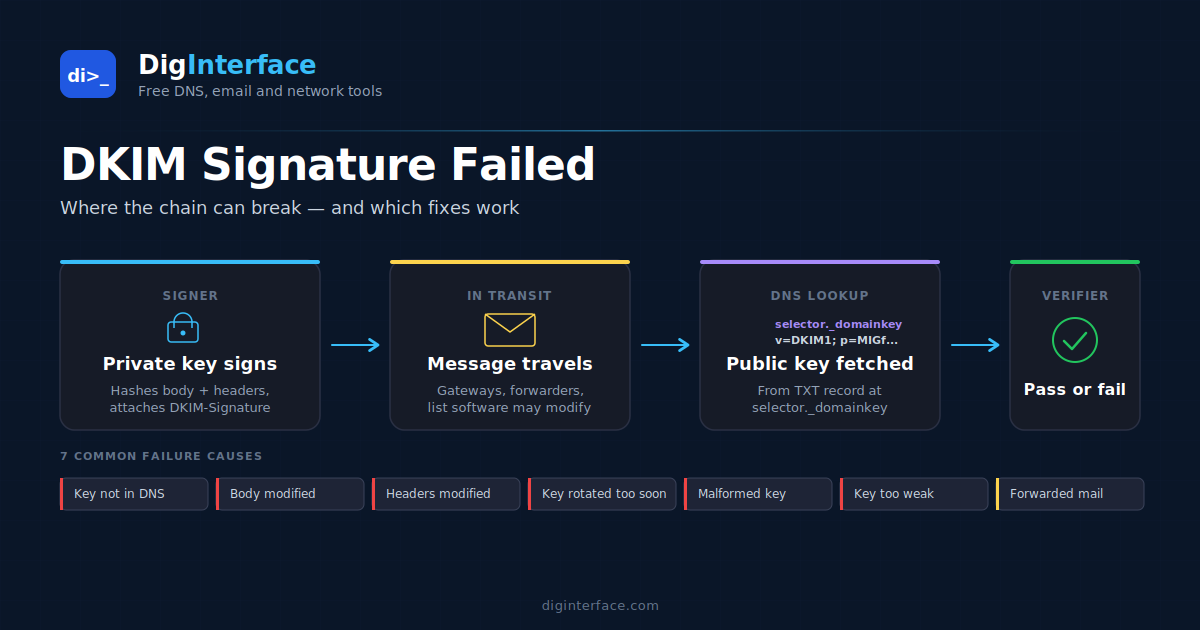
You found a dkim=fail in an email’s Authentication-Results header and now you’re trying to work out why. The good news is that despite DKIM’s reputation for being arcane, the actual failure modes are limited. After enough investigations, the same handful of root causes account for almost every failure you’ll see in production.
This article walks through the seven most common reasons DKIM signatures fail, how to diagnose each one from the header alone, and what to actually do about it. It assumes you know roughly what DKIM is — if you don’t, the one-line version is: the sender adds a cryptographic signature to outgoing mail using a private key, and the receiver verifies it using a public key published in DNS at <selector>._domainkey.<domain>. If the maths checks out, DKIM passes.
When it doesn’t, here’s why.
Reading the failure in the header
Every diagnosis starts with the Authentication-Results header. A failing DKIM result looks something like this:
Authentication-Results: mx.receiver.example;
  dkim=fail reason="signature verification failed"
    header.i=@example.com header.s=google header.b="aBcDeFg1";
  spf=pass smtp.mailfrom=example.com;
  dmarc=fail action=quarantine header.from=example.com
The four fields that matter:
reason— the specific failure mode, when the receiver bothers to include itheader.i— the identity (usually@domain) the signature was claimingheader.s— the selector the receiver looked upheader.b— the first few characters of the signature body, useful for distinguishing signatures if there are multiple
If the message has multiple DKIM signatures (common — many providers sign with both their domain and the customer’s domain), each gets its own dkim= block. A single failure among multiple signatures isn’t necessarily a problem; the question is whether any of the signatures align with the From header and pass.
With that, the seven causes.
1. The public key isn’t in DNS
The most common failure on newly configured DKIM — usually because the DNS record hasn’t been added, or was added but hasn’t propagated, or was added at the wrong host.
How to spot it: the receiver’s reason will be something like key not found in DNS, no key for signature, or no signature available. The header.s field tells you the selector to query.
How to verify: look up the key yourself with dig TXT <selector>._domainkey.<domain>. If it returns nothing or NXDOMAIN, the record genuinely isn’t there. Common patterns:
- Record added at the apex (
example.com) instead of<selector>._domainkey.example.com - Record added under the wrong subdomain (e.g.
selector._domainkey.www.example.com) - DNS provider quietly added a trailing dot or mis-handled the long TXT value
- TTL hasn’t expired yet on a recently-changed record
Fix: add or correct the TXT record at the right host. After publishing, give it long enough to propagate — DKIM lookups happen at delivery time, and receivers cache failures for some time.
2. The signed message body was modified in transit
DKIM signs both the headers and the body. If anything between the sender and receiver changes the body — even adding a single space — the signature breaks.
How to spot it: the reason will be body hash did not verify or body hash mismatch. This is one of the most diagnostic error messages — when you see it, you know exactly which half of the signature failed.
Common culprits:
- Mailing list software adding a footer (“To unsubscribe, click here…”) or rewriting parts of the body
- Anti-virus / anti-phishing gateways that rewrite URLs to route through their click-checking service
- Mail gateways that add disclaimers (“This email originated from outside…”)
- Encoding changes (quoted-printable → 7bit conversion, line-ending normalisation)
The standard c= (canonicalisation) parameter offers two modes: simple (strict — any whitespace change breaks the signature) and relaxed (tolerates whitespace normalisation but not content changes). Most signers use c=relaxed/relaxed which gives some protection against trivial changes, but no canonicalisation mode survives actual body modification.
Fix: if it’s your own gateway adding disclaimers or rewriting URLs after DKIM signing, move the modification step before signing, or stop modifying signed mail. If it’s a downstream forwarder you don’t control, this is a structural problem DKIM can’t solve — see cause #7 below.
3. Signed headers were modified in transit
The signature also covers a specific list of headers (declared in the h= parameter of the DKIM-Signature header). If any of those headers is added, removed, or changed between signing and verification, the signature breaks.
How to spot it: reason="signature did not verify" without specifically calling out the body hash. This is the catch-all when something in the headers changed.
Common culprits:
- Subject prefixing (
[mailing-list] Original subject…) - Reply-To rewriting by list software
- Header reordering by some legacy mail systems (rarer than it used to be)
- Adding
List-*headers when the signer includedList-Unsubscribeinh=
Fix: check the h= parameter in the DKIM-Signature header on the original signed message vs the headers as received. If a covered header has been touched, you’ll see it. The mitigation is usually the same as for body modification: either get the modifying party to sign their version too (ARC, see #7), or don’t cover headers likely to be modified.
4. The signing key was rotated and the old one removed too soon
If the sender rotates their DKIM key (publishing a new public key under a new selector, then switching the signer to use the new private key), there’s a window where messages in transit may still be signed with the old key. If you remove the old DNS record before that window closes, those in-flight messages fail.
How to spot it: failures clustered around a known key rotation. The header.s will point to the old selector and the lookup will return nothing.
Fix: when rotating keys, keep the old public key in DNS for at least 7–14 days after switching the signer over. Most ESPs handle this automatically; if you’re rolling your own DKIM (Postfix with opendkim, say), the procedure is your responsibility.
5. The DKIM key in DNS is malformed or has the wrong syntax
If the TXT record exists but isn’t a valid DKIM key record, the receiver will fail to parse it and report a failure.
How to spot it: reason="key syntax error", reason="invalid key", or reason="bad key".
Common causes:
- DNS provider truncated the long TXT value at 255 characters (a single TXT string is capped at 255 bytes; longer values need to be split into multiple quoted strings within the same TXT record)
- Missing
v=DKIM1tag at the start - Missing or malformed
p=(the actual public key) - Stray whitespace or newlines inserted by the DNS provider’s UI
- A
;after the last tag (some providers handle this, some don’t)
A valid key record looks like this:
v=DKIM1; k=rsa; p=MIGfMA0GCSqGSIb3DQEBAQUAA4GNADCBiQKBgQ...truncated...AQAB
Fix: look up the record (dig +short TXT <selector>._domainkey.<domain>) and verify the format. If the key is one long unbroken string in the dig output but came back malformed when verifying mail, it’s likely a 255-character split issue at the DNS provider.
6. The signature is using a key that’s too weak
DKIM supports both RSA and Ed25519 keys. For RSA, the minimum acceptable key length has crept up over the years — some receivers now reject signatures from keys shorter than 1024 bits, and a few reject anything under 2048.
How to spot it: reason="key too small", reason="signature algorithm not accepted", or reason="insufficient key size". May also show up as dkim=neutral rather than fail on some receivers — they refuse to verify rather than flagging it as a failure.
Fix: publish a new key at a new selector, switch your signer over, leave the old key live during the rotation window, then remove it. 2048-bit RSA is the safe default in 2026; Ed25519 keys are smaller and faster but receiver support has historically been spotty (this has improved significantly over the last few years, but a brief test against Gmail, Outlook and a corporate gateway is still worth doing before going Ed25519-only).
7. Forwarding broke the signature (structural, not a misconfiguration)
When someone forwards your mail through a personal account, a corporate auto-forward rule, or a mailing list, the forwarder usually delivers the message from its own IP — which breaks SPF — and often modifies the body or headers, which breaks DKIM.
This isn’t a bug to fix; it’s how mail forwarding works. The DKIM failure on forwarded mail is expected, not pathological.
How to spot it: the original sending IP doesn’t match the receiver’s view of the source IP (Received headers tell you the path), and the message has list-related headers (List-Id, List-Unsubscribe, Mailing-List) or has clearly been munged (footer added, subject prefixed).
The mitigation: ARC (Authenticated Received Chain). ARC lets a forwarding mail server vouch for the original authentication results — effectively saying “I received this message with passing DKIM, and even though I modified it, here’s a signed statement of what the original looked like”. A receiver that trusts the forwarder can then honour the original DKIM result rather than re-verifying.
ARC adoption is growing. Google, Microsoft, and most major mailing lists now ARC-sign. Whether the receiver honours an ARC chain depends on whether it trusts the forwarder, which means in practice this still doesn’t fully solve forwarding — but it’s the right direction.
For your own domain, there’s nothing to configure for ARC; it’s a receiver-side feature. The only “fix” for forwarder failures on outbound mail you’ve sent is to accept them as background noise in DMARC reports.
A quick diagnostic checklist
Faced with a dkim=fail, walk through these in order:
- Does the public key exist?
dig TXT <selector>._domainkey.<domain>should return a valid record. - Is the key syntactically correct? Starts with
v=DKIM1, hasp=with a valid base64 key, no stray characters. - Is the failure on the body or the headers?
body hash did not verifypoints at the body, anything else usually points at headers or key issues. - Has the message been forwarded? Check the
Receivedchain andList-*headers. - Is the key strong enough? If the receiver reports a weak-key failure, rotate to 2048-bit RSA.
- Was there a recent DNS or signer change? Recent rotations and reconfigurations are responsible for a surprising fraction of failures.
If you’ve worked through this list and you’re still stuck, the Authentication-Results header from a major receiver (Gmail and Microsoft tend to be the most diagnostic) usually has enough detail to nail it down. Pasting the headers into an analysis tool that breaks them out cleanly tends to be faster than reading them in the raw.
The bottom line
DKIM failures look intimidating but cluster around a small set of repeating causes. Missing or malformed DNS records account for most failures on newly configured DKIM. Body or header modifications by gateways and mailing lists account for most failures on established DKIM. Key rotations account for most of the rest. Forwarding accounts for the “expected” background level of failure that you can’t eliminate.
If you’re seeing DKIM failures on mail you control end-to-end, the cause is almost always one of the first six. If you’re seeing them on mail that’s been forwarded or processed by a third party in transit, you’re looking at the structural limit of DKIM and the answer is either ARC support, accepting the failure, or rerouting around the modifying party.