You added one more vendor to your SPF record — Salesforce, Zendesk, a new transactional ESP — and now mail from your domain is failing authentication. Your SPF record looks fine to the eye. But somewhere downstream a receiver is returning spf=permerror, and you’ve fallen off the edge of the 10 DNS lookup limit.
The limit is one of SPF’s oldest and most consequential gotchas. Every domain that uses multiple email senders will hit it eventually, and the failure mode is silent: receivers don’t notify you, your DMARC reports just start showing SPF failures on mail that used to pass. This article explains what counts as a lookup, why the limit exists, how to count yours, and the practical ways to stay under it.
What the 10 lookup limit actually is
RFC 7208 section 4.6.4 states that during SPF evaluation, a receiver “MUST limit the total number of mechanisms and modifiers that do DNS lookups to at most 10 per SPF check”. Exceed that count, and the receiver must abort with permerror (permanent error). From the message’s perspective, SPF effectively failed.
The limit exists for two reasons:
- DNS amplification. Without a cap, a maliciously crafted SPF record could trigger hundreds of DNS queries from every mail receiver that processed a message — a DDoS multiplier.
- Performance. SPF evaluation blocks SMTP delivery. A receiver waiting on a chain of slow DNS lookups is a receiver holding open an SMTP connection it should have closed.
10 was chosen as a reasonable upper bound for legitimate use. In 2014 that was generous. In 2026, with most domains using 5-10 third-party senders, it’s tight.
What counts as a lookup
This is where most people get it wrong. The lookups that count toward the limit are specifically the mechanisms that resolve domain names:
include:— counts as 1a— counts as 1mx— counts as 1 (plus 1 for each MX record returned, but the additional MX lookups don’t count separately in the lookup limit — only the initial query does)ptr— counts as 1 (and is deprecated; don’t use it)exists:— counts as 1redirect=— counts as 1
Mechanisms that don’t count:
ip4:— direct IP, no lookupip6:— direct IP, no lookupall— no lookup+,-,~,?qualifiers — no lookup
The critical thing to understand: includes are recursive. If your record contains include:_spf.google.com, that’s one lookup for you. But _spf.google.com itself contains include:_netblocks.google.com, include:_netblocks2.google.com, and include:_netblocks3.google.com — three more lookups. Each of those may include further records. The total count for your domain is the sum of every lookup triggered by your record, all the way down.
A worked example
Consider this SPF record:
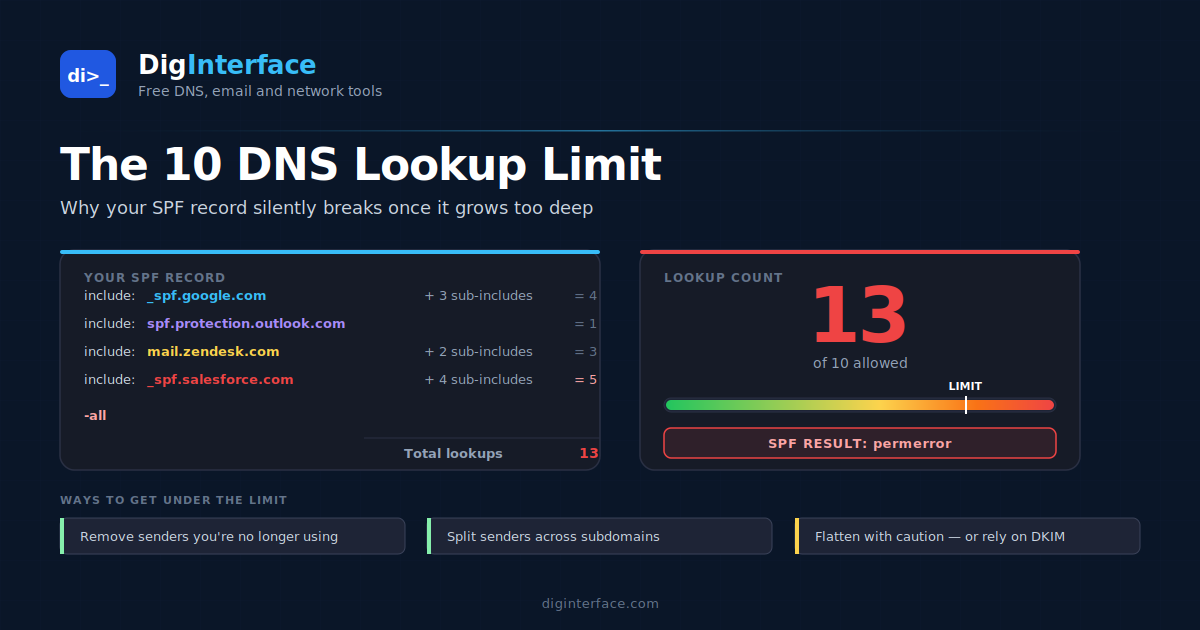
v=spf1 include:_spf.google.com include:spf.protection.outlook.com include:mail.zendesk.com include:_spf.salesforce.com -all
Looks innocuous — four includes plus all. Surely that’s only 4 lookups?
Let’s count what each include actually triggers (counts shown are typical at the time of writing — they change without notice):
| Include | Lookups |
|---|---|
_spf.google.com |
4 (the include itself + 3 sub-includes for netblocks) |
spf.protection.outlook.com |
1 |
mail.zendesk.com |
3 |
_spf.salesforce.com |
5 |
Total: 13 lookups. Over the limit by 3.
The record looks fine. SPF evaluation will return permerror on every receiver that follows the spec, which is all of them. Your mail starts going to spam and you have no idea why.
How to count your own lookups
You don’t count them by hand. Use an SPF expander that walks the include chain recursively and shows you the total. Most tools — DigInterface’s expander among them — will display the count and flag whether you’re over the limit.
A typical output looks like:
Total DNS lookups: 12 / 10 — PERMERROR
  include:_spf.google.com (4)
    include:_netblocks.google.com (1)
    include:_netblocks2.google.com (1)
    include:_netblocks3.google.com (1)
  include:spf.protection.outlook.com (1)
  include:mail.zendesk.com (3)
  ...
Run the expander on your domain. Then run it on the domains of any sender you’re about to add — see how many lookups they’d contribute before you publish them.
How to get under the limit
There are five practical ways, in rough order of preference:
1. Remove senders you’re not using
The most common cause of an over-limit SPF record is accumulated cruft — every vendor that ever sent mail for you is still in there. Audit the list against actual sending activity (DMARC aggregate reports are perfect for this — they tell you who’s currently sending). Remove anything that hasn’t sent in 6 months.
2. Switch to subdomains for separation
Different senders can live under different subdomains. Your transactional mail can go through mail.example.com, your marketing through marketing.example.com, your support through support.example.com. Each subdomain has its own SPF record, its own 10-lookup budget.
This requires the senders themselves to be configured to use the subdomain — they need to be set up to use it both as the From header and as the envelope sender (return-path), which most ESPs support. It’s the cleanest long-term answer but it requires coordination.
3. Use ip4: / ip6: directly where stable
If a sender publishes a list of IP ranges that rarely change, you can paste those ranges into your SPF record as ip4: mechanisms instead of using their include:. No lookup needed.
The trade-off: when the sender changes their IPs, your SPF record breaks until you update it. Some senders publish their IPs explicitly for this purpose; others change them frequently enough that maintaining a static list is more pain than the lookup it saves. Treat this as a tactical fix, not a strategy.
4. SPF flattening
SPF flattening means replacing all your include: mechanisms with the actual IP addresses they would have resolved to. The result is a long SPF record that has zero remaining lookups but encodes all the same authorisation.
Several services offer this as a managed product — they resolve the includes periodically, generate a flat record, and serve it from their own DNS. Your domain points to theirs. When upstream senders change IPs, the service detects it and regenerates your record.
This works, but it adds a third party to your DNS path and creates a dependency on the flattening service’s uptime and freshness. It’s also a battle against SPF’s intent — the spec deliberately uses includes so vendors can change their IPs without every customer rewriting records.
5. Drop senders into DKIM-only authentication
SPF isn’t the only path to DMARC alignment. If a vendor sends mail signed with your DKIM key (aligned to your domain), the message can pass DMARC via DKIM alone — SPF can fail without consequence. If you have a sender that’s hard to include in SPF but supports DKIM signing with your domain, you can drop them from SPF entirely.
This works particularly well for senders that already break SPF in practice anyway (e.g., systems that send from rotating IPs that don’t fit into your envelope-sender model).
A note on the void lookup limit
Separately from the 10 lookup limit, RFC 7208 also defines a “void lookup” limit: at most 2 DNS queries during SPF evaluation may return empty answers (NXDOMAIN or NOERROR with no records). Exceeding this also returns permerror.
Void lookups usually indicate stale entries — an include: pointing at a domain that no longer publishes an SPF record, or a hostname that no longer exists. They’re worth fixing for hygiene even when you’re well under 10 lookups, because they take you closer to permerror without contributing any useful authorisation.
What permerror looks like in the wild
When a receiver returns permerror, the message typically isn’t rejected outright — permerror is treated similarly to softfail by most major receivers, in that the message is accepted but the SPF signal can’t be used. The real damage comes downstream:
- DMARC. Because SPF returned
permerror, it can’t contribute to DMARC alignment. If DKIM passes, you’re fine. If DKIM fails or wasn’t signed by an aligned domain, DMARC fails too, and yourp=quarantineorp=rejectpolicy kicks in. - Spam scoring. Receivers treat
permerroras a negative reputation signal, contributing to the message landing in spam. - Visibility. DMARC aggregate reports will show
spf: failrecords on mail that’s been your normal sending pattern for years, with no obvious cause unless you check the lookup count.
The bottom line
The 10 DNS lookup limit isn’t a guideline — it’s a hard cap baked into the SPF spec, and every spec-compliant receiver enforces it. Records over the limit return permerror, which silently degrades deliverability and breaks DMARC alignment via SPF.
Count your lookups regularly, especially after adding a new sender. Audit out vendors you’re no longer using. For complex sending infrastructure, separate senders onto subdomains. Use SPF flattening only when nothing else works, and prefer DKIM-aligned authentication over fighting the SPF lookup budget when a sender supports both.
If you’re not sure where you stand, expand your record and look at the count — it’s the single most useful diagnostic you can run on an SPF setup.