If you’ve ever inspected an email’s Authentication-Results header and seen spf=softfail, or read an SPF record ending in ~all and wondered what the tilde does, this is the part of email authentication where the documentation tends to get vague. Softfail sits in an awkward middle ground between “this is fine” and “this is forged”, and that ambiguity is the whole point — but it also creates real confusion about when to use it and what receivers will actually do with the result.
This article covers what softfail means in the SPF specification, how mainstream mailbox providers actually treat it in 2026, the practical difference between ~all and -all, and which qualifier you should be using on your domain.
SPF qualifiers, briefly
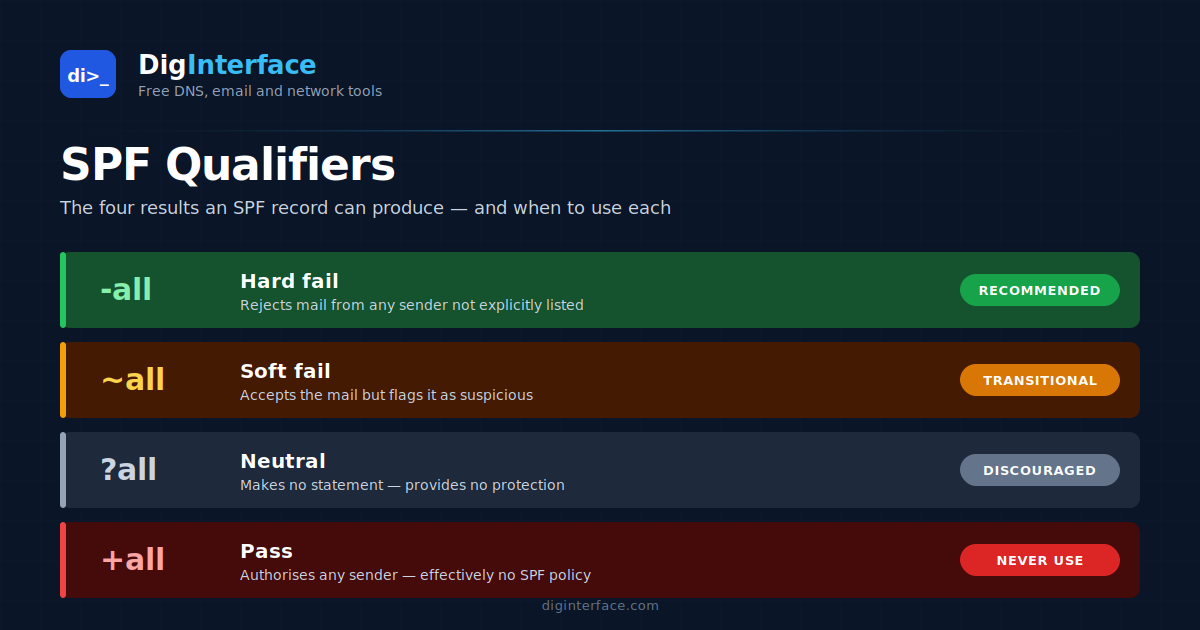
Every mechanism in an SPF record can be prefixed with a qualifier that tells the receiver what to do if the mechanism matches. There are four, and they map to four named SPF results:
| Qualifier | Result name | Plain meaning |
|---|---|---|
+ (default, usually omitted) |
Pass | This sender is authorised. |
? |
Neutral | I’m not making any statement about this sender. |
~ |
Softfail | This sender is probably not authorised, but accept the message anyway. |
- |
Fail | This sender is not authorised. Reject the message. |
The qualifier you almost always see, and the one we’re focused on here, is the all mechanism at the end of the record — the catch-all rule that applies if nothing earlier matched. So ~all means “softfail anything not explicitly authorised above” and -all means “hard-fail anything not explicitly authorised above”.
What the SPF spec actually says about softfail
RFC 7208 defines softfail as a weak statement by the publishing domain that, although the sender is not authorised, no strong policy statement is being made. The spec then explicitly states that messages with a softfail result must not be rejected on that basis alone. Receivers are expected to accept the message, but they may use the softfail signal as input to spam scoring or other heuristics.
In other words: softfail is a hint, not a verdict.
What receivers actually do with softfail
The spec’s guidance is one thing; what the big mailbox providers do in practice is what matters for deliverability. The honest answer is “it varies, and it changes”:
- Gmail: treats softfail as a mild negative signal that contributes to spam scoring but is not, on its own, enough to send a message to spam. A softfail combined with a DKIM failure or DMARC misalignment is much more likely to trigger filtering than softfail in isolation.
- Microsoft (Outlook.com, Office 365): similar — softfail feeds into the spam confidence level but isn’t an automatic rejection. EOP documentation specifically calls out that softfail and neutral results are evaluated by other filters.
- Yahoo / AOL: historically more aggressive about treating softfail as suspicious; this has softened over time.
- Corporate / on-prem filters (Mimecast, Proofpoint, Barracuda, etc.): behaviour is configurable per tenant. Many default to scoring softfail negatively but accepting the message; some are configured to outright reject softfail in stricter policies.
The practical implication: softfail won’t get a legitimate message rejected by the major consumer providers, but it does provide cover for forgeries that pass the rest of your filters.
When ~all made sense, and why that’s changed
When SPF was younger and DMARC didn’t exist, ~all was the cautious default. The reasoning went like this: you might not know every single IP that sends mail for your domain. Marketing tools, support ticketing systems, internal scripts running on forgotten boxes — any one of those might send mail without you having added it to SPF. A -all policy would cause those legitimate-but-unlisted senders to be rejected. A ~all policy would let them through while still discouraging obvious forgery.
That trade-off was reasonable in 2010. In 2026 it’s much weaker, for three reasons:
- DMARC changed the picture. DMARC builds on top of SPF (and DKIM) and lets you publish an explicit policy —
p=none,p=quarantine, orp=reject— that receivers honour. The DMARC policy now does the heavy lifting of telling receivers what to do with unaligned mail, which removes the original case for~all’s “gentle” behaviour. With DMARC in place, the SPF qualifier becomes a much less important signal. - Visibility tools improved. DMARC aggregate reports (the
rua=reports) tell you exactly which IPs are sending mail claiming to be from your domain. There’s much less need for~allto provide a soft landing for “senders you forgot about” — you can see them. - Receiver behaviour normalised. All major receivers now treat softfail and fail similarly in the presence of a strict DMARC policy. The “softfail is gentler” effect is largely cosmetic when DMARC is enforced.
~all vs -all: which should you use?
The decision tree most deliverability practitioners use today:
Use -all if you meet all of the following:
- You have a complete inventory of every system that sends email as your domain
- You have DMARC published, and you’re either enforcing it (
p=quarantineorp=reject) or about to - You’ve reviewed DMARC aggregate reports for at least a few weeks and there are no unexpected legitimate senders failing SPF
Use ~all if any of the following are true:
- You’re in the early stages of DMARC rollout and still using DMARC reports to discover unknown senders
- You have a complex or rapidly changing sending infrastructure where new sources sometimes appear before SPF can be updated
- You operate a parked or non-sending domain (although for these,
v=spf1 -allwith no other mechanisms is actually the recommended setting — see below)
Use ?all (neutral) essentially never. It tells receivers “I have no opinion”, which provides almost none of the value of SPF and offers no protection against forgery.
A special case: domains that don’t send mail
If a domain never sends email — for example, a marketing-only domain that just hosts a website — you should publish:
v=spf1 -all
This is one place where -all is unambiguously correct, because there are no authorised senders and any IP claiming to send from this domain is forged by definition. Combine this with a DMARC record at _dmarc.example.com:
v=DMARC1; p=reject; rua=mailto:dmarc-reports@example.com
…and you’ve effectively shut the front door to anyone trying to spoof the domain.
Common softfail troubleshooting scenarios
A few patterns that come up regularly when investigating SPF softfail results:
“My legitimate mail is getting softfail results.” Almost always means the sending IP isn’t in your SPF record. Check the Received header for the actual sending IP, then run the SPF record through an expander to confirm it isn’t in any of the include: or ip4:/ip6: mechanisms. New ESPs, newly-spun-up email relays, and recently-rotated sending pools are frequent culprits.
“I have ~all but messages are still going to spam.” SPF softfail is usually not the cause on its own. Check DKIM signing (is it passing? is the d= value aligned with the From header domain?), DMARC alignment, and content factors like sender reputation. The Authentication-Results header on the bounced message tells you exactly which check failed.
“My SPF record exceeds 10 DNS lookups.” This isn’t a softfail issue specifically but it produces a permerror, which receivers may treat similarly to softfail or worse. SPF flattening, or moving lookups inside a single include: that doesn’t itself trigger further lookups, are the usual fixes.
“Mail from forwarders gets softfail.” This is expected and not something SPF alone can fix — when a message is forwarded, the receiving server sees the forwarder’s IP, not the original sender’s. DKIM (which survives forwarding when the body and signed headers aren’t modified — mailing lists often modify them) and ARC (Authenticated Received Chain) are the right tools here, not SPF tweaks.
The bottom line
Softfail is a deliberately weak SPF result. It tells receivers “this probably isn’t authorised, but I’m not asking you to reject it”. In 2026, with DMARC in widespread use, the softfail signal matters less than it used to, and most domains should be working towards -all plus an enforced DMARC policy. Use ~all as a transition state while you complete your sender inventory, not as a permanent posture.
The qualifier you publish is one part of email authentication, not the whole picture. SPF, DKIM, DMARC, and ARC all play distinct roles, and your domain’s deliverability depends on getting them working together rather than on the exact qualifier you choose for any one of them.