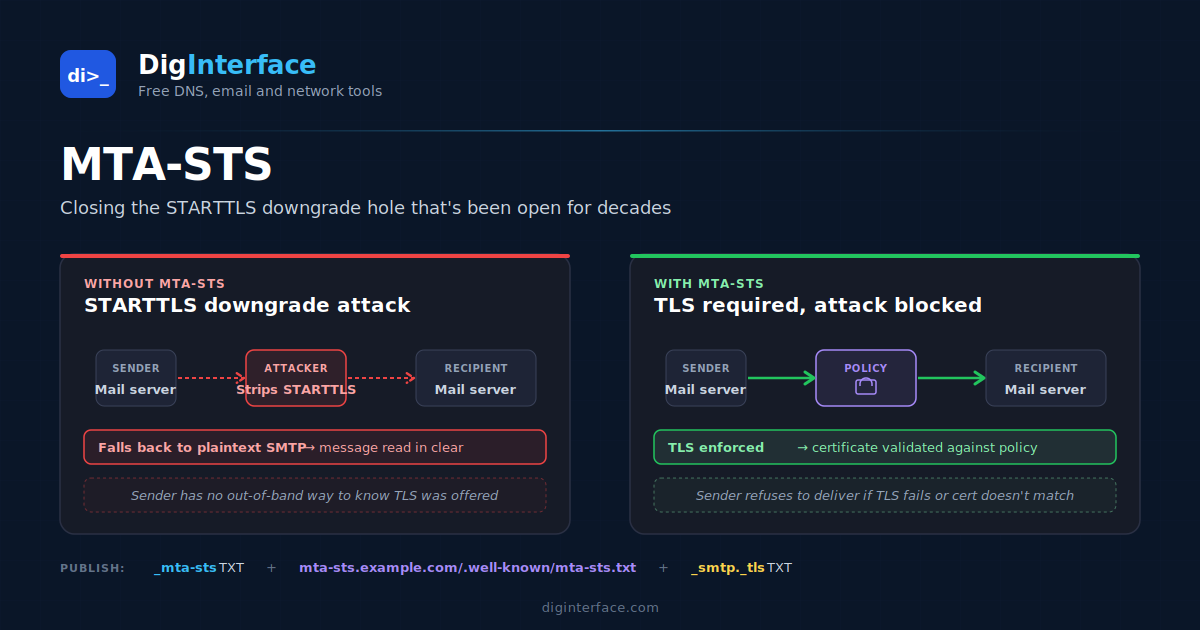
SMTP grew up in a world without security. Mail servers connected to each other in plain text, and the patches that retrofitted encryption — STARTTLS, mainly — were opportunistic by design. If TLS was offered, use it. If not, deliver anyway. It made adoption gradual and breakage rare, but it left a gaping hole: an attacker between two mail servers could simply strip the STARTTLS advertisement from the SMTP conversation, and both servers would fall back to plain text without complaint.
MTA-STS closes that hole. It’s a relatively recent standard (RFC 8461) that lets a domain publish a policy stating “any server delivering mail to me must use TLS, and the certificate must match these names”. A sending server that supports MTA-STS will refuse to deliver if those conditions aren’t met, removing the silent-downgrade path.
This article explains how MTA-STS works, how to publish it for your domain, the gotchas around the report-only mode, and the realistic limits of what it does and doesn’t protect.
The problem MTA-STS solves
The original SMTP TLS upgrade goes like this:
- Sending server connects to receiving server’s MX on port 25.
- Receiver greets, sends a list of supported extensions including
STARTTLS. - Sender issues
STARTTLS, the connection upgrades to TLS, message is delivered encrypted.
An attacker sitting between the two servers can intercept step 2 and remove STARTTLS from the extension list. The sender doesn’t see TLS offered, falls back to plain SMTP, and delivers the message in clear text — which the attacker can now read or modify.
The fundamental issue is that the sender has no out-of-band way to know whether STARTTLS should be available. MTA-STS provides exactly that out-of-band channel: a policy file fetched via HTTPS, anchored in DNS, telling senders what to expect.
How MTA-STS works
For your domain, you publish two things:
- A DNS TXT record at
_mta-sts.example.com, signalling that you have a policy and giving it a version identifier. - A policy file at
https://mta-sts.example.com/.well-known/mta-sts.txt, served over HTTPS with a valid certificate, describing the actual policy.
A sending server with MTA-STS support does this for each delivery:
- Looks up
_mta-sts.example.comTXT. If present and parseable, the recipient supports MTA-STS. - Fetches the policy file via HTTPS (caching it according to the policy’s max_age).
- When connecting to deliver mail, requires TLS, validates the certificate against the policy’s allowed MX names, and refuses to send in plain text or with an invalid certificate.
If any of this fails — and the policy is in enforce mode — the sender either retries later or eventually drops the message.
The DNS record
The TXT record at _mta-sts.example.com is minimal:
v=STSv1; id=20260512T140000Z
Two fields:
- v — version, always STSv1.
- id — an opaque identifier that changes when you change the policy. Senders cache the policy file by ID, so changing the ID forces a re-fetch. A timestamp is conventional.
That’s it. The record exists primarily to signal “I have a policy, here’s its ID for cache validation”. The actual policy lives elsewhere.
The policy file
The policy file at https://mta-sts.example.com/.well-known/mta-sts.txt looks like:
version: STSv1
mode: enforce
mx: mx1.example.com
mx: mx2.example.com
mx: *.mailgateway.example.com
max_age: 604800
Field by field:
version— alwaysSTSv1.mode— one ofnone,testing, orenforce. More on these below.mx— one or more lines listing your authorised MX hostnames. Wildcards are allowed (*.example.com).max_age— how long senders should cache this policy, in seconds. Common values are 86400 (1 day) to 31557600 (1 year). Longer is safer for normal operation but slower to recover from misconfigurations.
When a sender connects to deliver mail to your domain, its MX lookup returns a hostname, and that hostname must match one of the mx entries in the policy. If your MX returns mail.protection.outlook.com but your policy only lists mx.example.com, the sender refuses to deliver.
The file must be served:
- From the exact hostname mta-sts.<your domain> (a subdomain you control)
- Over HTTPS, with a valid certificate matching that hostname
- With Content-Type: text/plain (some senders are strict about this)
- Returning HTTP 200 (not redirects)
A misconfigured policy file is worse than no policy. Senders that fetch it will either fail open (continue without enforcement) or fail closed (defer/drop), depending on the implementation — neither is what you want.
The three modes
The mode field has three values, and choosing it correctly is the most important deployment decision.
none
The policy exists but is not enforced. Functionally equivalent to having no policy at all. Used briefly when winding down MTA-STS while waiting for caches to expire.
testing
Senders fetch the policy and report compliance failures via TLS-RPT (see below), but don’t actually enforce. Mail still gets delivered even if TLS isn’t available or the certificate doesn’t match.
This is the right mode for initial deployment. You publish the policy, watch the reports for a few weeks, confirm everything that should be authorised actually is, and then promote to enforce.
enforce
The mode that does what MTA-STS is for. Senders refuse to deliver mail if TLS isn’t available or the certificate doesn’t match the policy. Failed deliveries are reported via TLS-RPT.
Switching to enforce on a domain you haven’t tested in testing mode first is a risk. If your MX hostname changes without the policy being updated, you’ll silently start failing inbound mail.
TLS-RPT (the reporting standard)
MTA-STS pairs with TLS-RPT (TLS Reporting, RFC 8460), which is the channel senders use to tell you when MTA-STS or other TLS enforcement caused delivery problems.
You publish a second DNS TXT record at _smtp._tls.example.com:
v=TLSRPTv1; rua=mailto:tls-reports@example.com
Senders that support TLS-RPT will email you daily summaries of TLS issues: how many messages they tried to deliver, how many succeeded with TLS, how many failed for what reason. These reports are critical during testing mode and useful as ongoing monitoring once you’re in enforce.
The TLS-RPT report format is JSON, so it’s machine-parseable. Most managed deliverability platforms can ingest it.
How to deploy MTA-STS
A practical rollout looks like this:
Step 1: Set up the policy host. Create mta-sts.example.com as a separate subdomain. Get a TLS certificate for it (Let’s Encrypt is fine). Serve /.well-known/mta-sts.txt over HTTPS with the correct MIME type. Confirm you can fetch it: curl -v https://mta-sts.example.com/.well-known/mta-sts.txt should return your policy file with status 200.
Step 2: Publish DNS records in testing mode.
_mta-sts.example.com.       TXT   "v=STSv1; id=20260512T140000Z"
_smtp._tls.example.com.     TXT   "v=TLSRPTv1; rua=mailto:tls-reports@example.com"
And the policy file content with mode: testing.
Step 3: Wait and watch. TLS-RPT reports arrive daily from major senders. Check whether any of them are showing TLS failures on legitimate inbound mail. Common issues you’ll catch:
- An MX hostname in your DNS that isn’t in your policy
- An MX server presenting a certificate that doesn’t match its hostname
- A certificate that’s expiring soon
- An MX that doesn’t support TLS at all (rare in 2026, but possible for legacy infrastructure)
Step 4: Fix anything the reports flagged. Either update the policy to list missing MXs, or fix the underlying MX configuration.
Step 5: Promote to enforce. Edit the policy file to change mode: testing to mode: enforce. Update the id= field in DNS to invalidate sender caches.
Step 6: Monitor. Keep watching TLS-RPT reports. If you change MX configuration in the future, update the policy before the change goes live, and bump the id= field.
Common gotchas
A few things that catch people out:
Certificate mismatches on the MX itself. Your MX hostname must match the certificate it presents. If mx.example.com presents a certificate for mail.example.com, MTA-STS will refuse it. Wildcard certs (*.example.com) work as long as the MX hostname is one level below.
Forgetting the id= bump. Senders cache policies aggressively. If you change the policy file but not the id= field in DNS, senders won’t notice for up to max_age seconds. Always update both together.
Setting max_age too high during rollout. During testing mode, a long max_age means a long cache invalidation window when you change anything. Start with a short max_age (86400, one day) and lengthen it once stable.
HTTPS certificate on the policy host. The mta-sts.example.com hostname needs its own certificate — separate from your main website’s. If you use Let’s Encrypt, automate renewal. A policy file behind an expired certificate is effectively a missing policy.
The “wildcard MX” trap. Lines like mx: *.protection.outlook.com work for Outlook tenant MXs, but * only matches one DNS label. mail-east.protection.outlook.com matches; mail.east.protection.outlook.com does not.
What MTA-STS doesn’t protect against
It’s important to be honest about MTA-STS’s scope:
- Outbound mail. MTA-STS protects mail being delivered to your domain. It does nothing for mail you send to other domains — that’s the recipient’s MTA-STS policy at work, not yours.
- Mail to non-MTA-STS senders. Only senders that support MTA-STS check your policy. Adoption is broad among major providers but not universal. A sender that doesn’t speak MTA-STS will still deliver to you in whatever way it would have without your policy.
- Compromised certificates. MTA-STS validates that the cert matches the MX hostname; it doesn’t validate that the cert hasn’t been issued by a compromised CA. DANE (RFC 7672) is the answer for that, and is complementary rather than competitive — domains can publish both.
- TLS version or cipher quality. MTA-STS requires TLS but doesn’t dictate which version or ciphers. A receiver supporting only TLS 1.0 and weak ciphers technically satisfies MTA-STS.
The bottom line
MTA-STS closes the STARTTLS downgrade hole that’s been in SMTP for decades. It’s not particularly complex to deploy — three things to set up (the policy host, two DNS records, the policy file), one mode transition to manage. Major mailbox providers support it, and TLS-RPT gives you visibility into what’s actually happening once you’ve turned it on.
If you operate a domain that receives sensitive email — corporate, financial, healthcare — MTA-STS is one of the higher-value security upgrades you can make with a few hours of work. Start in testing mode, run TLS-RPT for two to four weeks, fix anything the reports surface, then promote to enforce.