Every DNS operator eventually runs into it: a domain resolves fine most of the time, but some clients see stale data. You check the records, they look right, but the symptom persists. The culprit is usually one authoritative nameserver disagreeing with the others — a secondary that hasn’t picked up the latest zone update, a split-brain configuration, or a multi-provider setup that’s drifted out of sync. Diagnosing it normally means firing dig +norec @ns1, dig +norec @ns2, dig +norec @ns3 one at a time and eyeballing the output.
Not anymore.
The new “Query all Name servers” checkbox
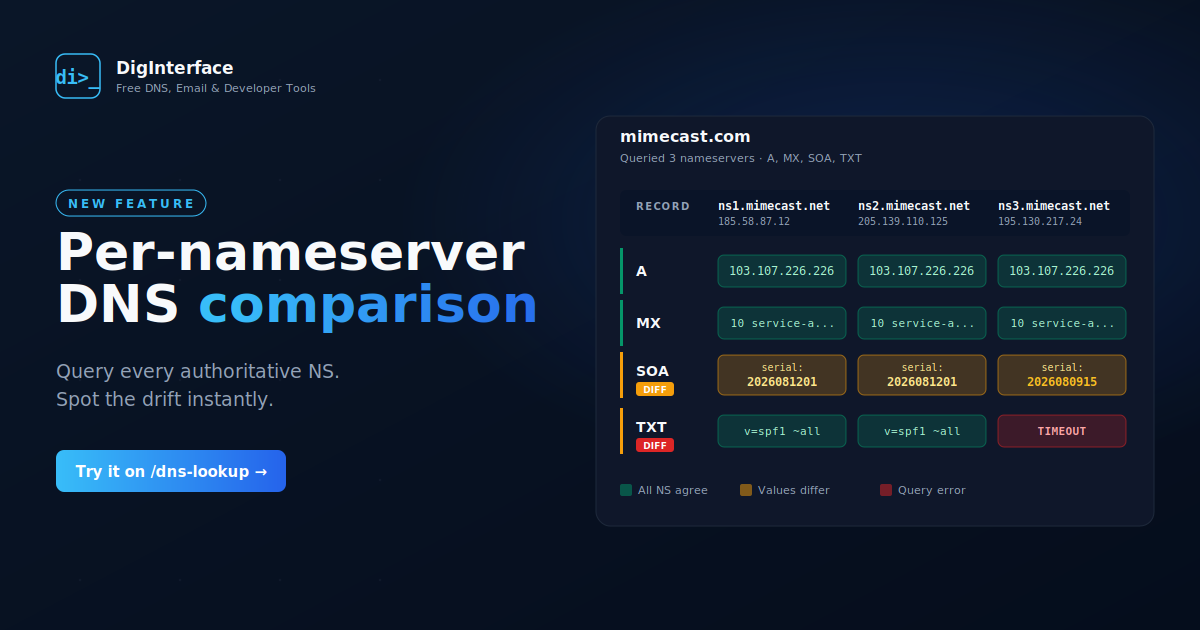
Head to DNS Lookup, enter your domain, pick your record types, and tick the new Query all Name servers option. Submit, and instead of the usual single-resolver output you’ll get a side-by-side comparison table: one column per authoritative nameserver, one row per record type, with the actual returned values in each cell.
The tool resolves the domain’s NS RRset, then queries each nameserver directly with recursion disabled (RD=0) so every server has to answer for itself — no caching, no delegation, no hiding behind a recursive resolver. If one server times out, refuses, or returns SERVFAIL, that shows up in its column, not as a mystery gap.
Colour-coded consensus at a glance
Each cell is coloured to make disagreement impossible to miss:
- Green — the record was returned and every nameserver agrees on the value. Nothing to see here.
- Amber — this nameserver returned a value that differs from the others, or explicitly returned
NODATAfor a record type the others have. The record type row also gets a smalldiffbadge so you can find the divergent rows at a glance. - Red — the query itself failed.
TIMEOUT,REFUSED,SERVFAIL,NXDOMAIN, or the nameserver’s IP couldn’t be reached at all.
Comparison is order-insensitive where that matters: MX records are sorted by preference before diffing (so 10 mail1 / 20 mail2 on one server won’t be flagged as different from 20 mail2 / 10 mail1 on another), TXT chunks are joined before comparison, and everything else is compared as a set.
SOA serials — the smoking gun
The single most common inconsistency in the wild is nameservers reporting different SOA serials — a classic sign that a secondary is behind on zone transfer. Pick SOA in the record types and you’ll see each server’s full SOA record (mname, rname, serial, refresh, retry, expire, minttl) in its cell. If the serials disagree, the row is flagged and the odd server jumps out amber.
TXT and CSV export for the paper trail
Two download buttons at the bottom of the results:
- Download TXT — a human-readable per-domain / per-record breakdown, with
[CONSENSUS]or[DIFF]tags on each record type. Good for pasting into a ticket or an email. - Download CSV — one row per (domain, nameserver, record type, value), with a
Consensuscolumn set toyes/no. Open in Excel, filterConsensus = no, and every divergent record across every domain you queried is a single filter operation away.
The CSV export uses proper escaping, so TXT records containing commas or embedded quotes (common with modern verification strings) round-trip cleanly into a spreadsheet.
When to reach for it
- A DNS change hasn’t propagated the way you expected. Query the domain per-NS, look for SOA serial disagreement, and you’ll know instantly whether one of the authoritative servers is behind.
- You’ve moved from a single DNS provider to a multi-provider setup and want to confirm both providers are serving identical records.
- A customer complains that email is being delivered to the wrong endpoint intermittently. MX records that disagree across nameservers explain a lot of “intermittent” delivery mysteries.
- Before a zone cutover, run the comparison against both the old and new NS sets to confirm the new servers are actually serving the zone you think they are.
The queries fan out concurrently with a bounded thread pool, a 3-second per-query timeout, and an 8-second overall deadline — so even a domain with an unresponsive nameserver returns useful results rather than hanging your browser.
Give it a try on a domain you know is healthy first to see what “all green” looks like, then point it at anything you’ve been chasing symptoms on.